About this page
Review previous sessions and judgment results to follow changes in your playing.
Before you begin
- Complete a Training Mode session
- History is stored on the current device
Steps
- 01
Open Practice Record
Open Practice Record from the menu.
- 02
Select a session
Choose a session by date and song.
- 03
Compare results
Review accuracy, judgment totals, and personal bests.
Reading the screen
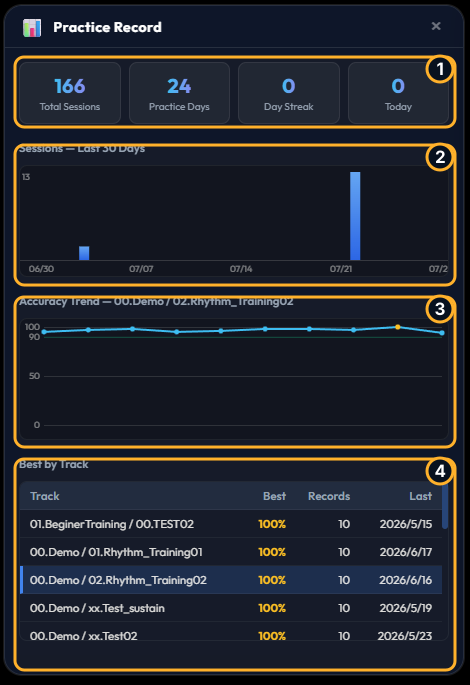
- 1Summary cards
Total Sessions is the total number of sessions, Practice Days is the number of days practiced, Day Streak is the consecutive-day streak, and Today is today’s session count.
- 2Sessions — Last 30 Days
Shows daily session counts for the last 30 days as a bar chart, making practice frequency and gaps easy to review.
- 3Accuracy Trend
Shows the selected track’s Accuracy for each session as a line chart.
- 4Best by Track
Lists each track’s best Accuracy, number of records, and most recent practice date. Select a row to update Accuracy Trend for that track.
Tip
Repeating the same song at the same tempo makes progress easier to compare.