About this page
Subscribe to shared MIDI content or publish your own practice material.
Before you begin
- Launch the app through Steam
- Confirm content rights before publishing
Steps
- 01
Subscribe to content
Choose an item in Workshop and subscribe.
- 02
Load it in the app
After download, select it from the album list.
- 03
Publish your content
Set the upload mode, content type, title, content folder, visibility, and other item details.
Reading the upload form
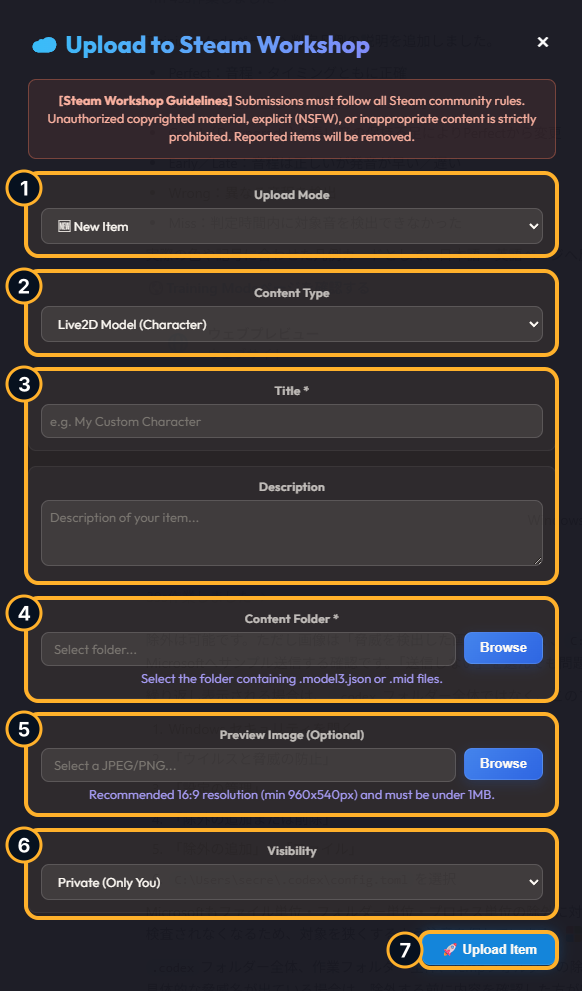
- 1Upload Mode
Use New Item for a new submission or Update Existing Item to update one of your published items. Selecting a previously published folder may suggest update mode automatically.
- 2Content Type
Select Live2D Model (Character) or TAB / MIDI (Album). Live2D uploads require the Live2D Import DLC.
- 3Title and Description
A title is required. Use the description for contents, included material, and any usage conditions.
- 4Content Folder
Select the folder to publish. A Live2D folder must contain a .model3.json file, while a TAB / MIDI folder must contain a .mid file.
- 5Preview Image
Optionally select a JPEG or PNG image. A 16:9 image of at least 960×540 px and under 1 MB is recommended.
- 6Visibility
Choose Private, Friends Only, or Public. The default is Private.
- 7Upload Item
Review the form and start the upload. Keep Steam and the app running until it finishes. Your first submission may require acceptance of the Steam Workshop agreement.
Guidelines
- Do not publish music, images, characters, or other material protected by third-party rights without permission
- Sexually explicit or NSFW material, discriminatory or abusive material, and other inappropriate content are prohibited
- All submissions must comply with the Steam Community rules and Steam Workshop guidelines
Content that violates these requirements may be hidden or removed. You are responsible for reviewing your submission and obtaining all necessary rights and permissions.