About this page
Use TAB and playback as practice material without enabling Training Mode.
Before you begin
- Select an album and song
- A PC guitar connection is not required
Steps
- 01
Choose playback mode and speed
With MIDI Tempo Map OFF, set a fixed BPM. Turn it ON to follow tempo changes in the song and adjust the overall playback speed.

OFF adjusts BPM. ON preserves tempo changes while adjusting the overall playback speed as a percentage. - 02
Move to the phrase
Use the score or playback position to find the phrase you want to practice.

Focus the playback-position slider and press the Left or Right Arrow key to move one measure at a time. - 03
Practice repeatedly
Use the metronome and repeat controls to work on the phrase.

Enable standard repeat and the metronome independently as needed.
MIDI Tempo Map
Choose whether playback follows tempo changes embedded in the MIDI file. Use the MIDI Tempo Map button in the player to switch between ON and OFF.
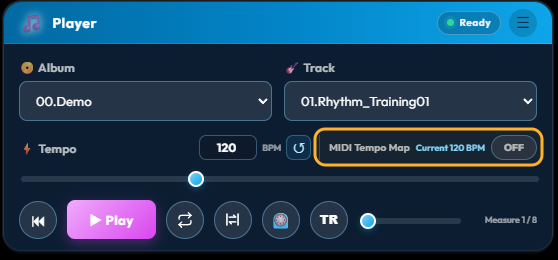
| Setting | Playback | Speed control | Reset |
|---|---|---|---|
| OFF | Ignores MIDI tempo changes and plays the entire song at one fixed BPM. | 60–240 BPM | Original song BPM |
| ON | Follows MIDI tempo changes while preserving speed changes throughout the song. | 50–200% | 100% |
- Current BPM shows the tempo active at the current playback position
- When ON, the score shows the tempo active at the start of each measure, while playback follows every tempo event, including changes within a measure
- The ON/OFF setting and the playback speed used while ON are retained for the next launch
- Switching during playback stops at the same position. Press Play to resume after switching
Switching during Training Mode resets the judgments collected so far. Choose the setting before starting a practice session.
A–B Section Repeat
Select specific measures and repeat only that section.

- 01
Enable A–B selection
Press the section-repeat icon in the player to enable range selection on the score.
- 02
Drag across the score
Drag from the first measure you want to practice to the last. The range snaps to measure boundaries and appears in pale yellow with A and B markers. You can also drag from right to left.
- 03
Play the section
Playback starts at A and automatically returns to A after the final selected measure. While a range is active, the reset control also returns to A.
- 04
Clear the range
Press the A–B button again or press Esc. Selecting another song also clears the range.
Standard repeat is unavailable while A–B section repeat is active. A–B section repeat cannot be used at the same time as Training Mode.
Tip
Use Training Mode when you want Perfect, Early, Late, and other results recorded.