About this page
Evaluate guitar pitch and timing in real time and display results on the score.
Before you begin
- Configure audio input and latency
- Select a song that supports performance evaluation
Steps
- 01
Enable Training Mode
Use the TR button in the player or your configured keyboard shortcut.
- 02
Play with the score
Perfect, Early, Late, Wrong, Miss, and other judgments appear on the score.
- 03
Finish the session
End playback or stop the session, then review the result in the Training panel.
Reading the screen
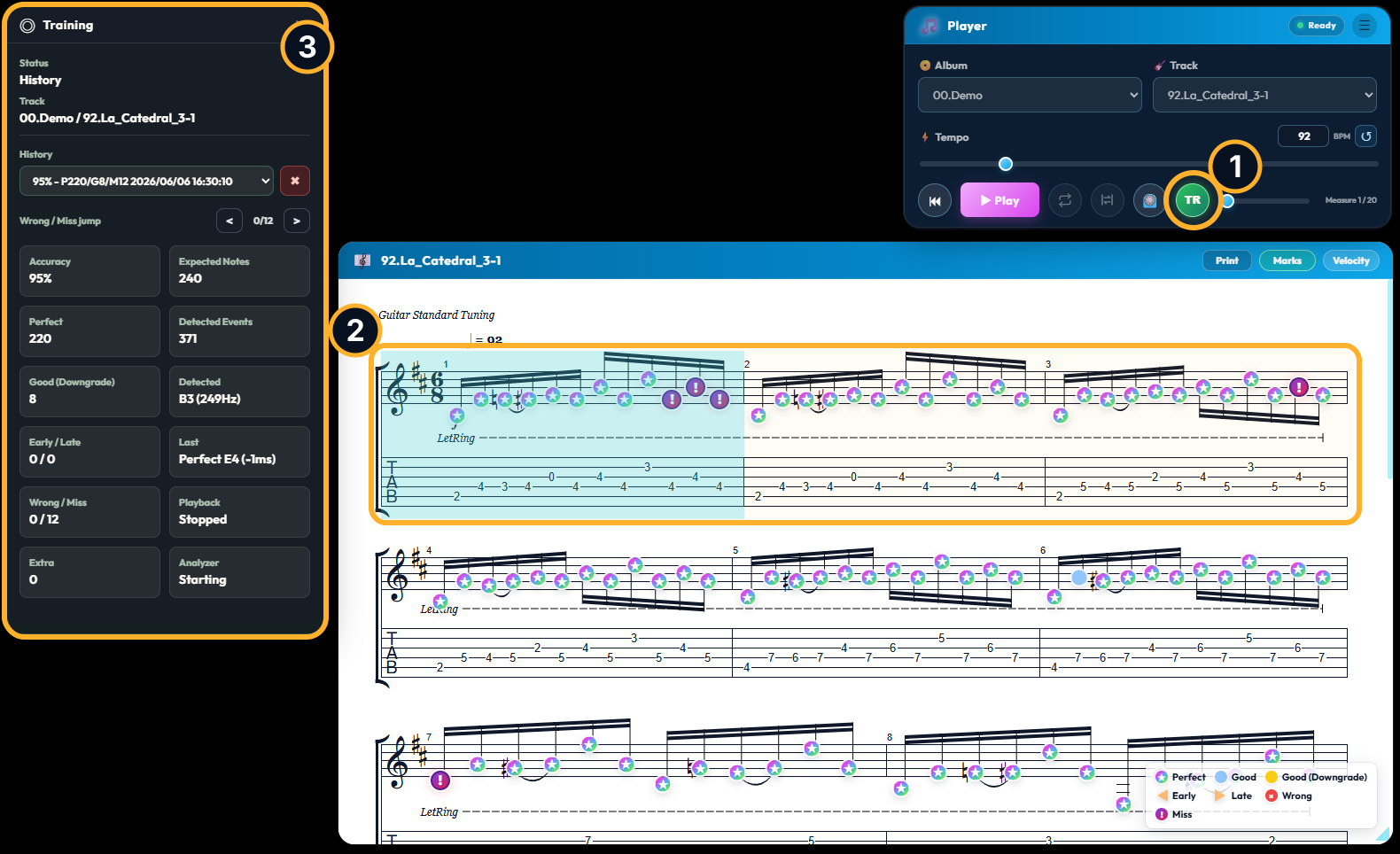
- 1TR button
Start or stop Training Mode. The button appears green while Training Mode is enabled.
- 2Judgment marks on the score
Perfect, Good, Good (Downgrade), Early, Late, Wrong, and Miss are shown with distinct colors and symbols. Use the legend in the lower-right corner.
- 3Training panel
Review accuracy, judgment counts, detected pitch, and playback or analyzer state. You can also select history and jump between Wrong or Miss positions.
Judgment types
Each mark on the score reflects pitch, attack timing, and, when applicable, how well a note was sustained.
The pitch is correct and the attack falls within the Perfect timing window.
The pitch is correct and the timing remains acceptable, but the attack is slightly earlier or later than the Perfect window.
The attack was initially Perfect, but a longer note was not sustained sufficiently and was changed to Good.
The pitch is correct, but the attack is earlier than the accepted timing range.
The pitch is correct, but the attack is later than the accepted timing range.
A detected pitch does not match the expected note.
The expected note was not detected before its judgment window ended.
Using a clear guitar signal
Training Mode is more likely to judge notes correctly when the pitch is clear and the signal contains less noise and fewer excessive overtones.
- Start with a clean amp or effects setting
- For electric guitar, the bridge pickup is recommended
- Keep heavy distortion, delay, reverb, chorus, and similar effects to a minimum
- Set an appropriate input level so the signal is neither too quiet nor clipping
- Mute strings you are not playing to reduce unwanted resonance and noise
The best setting varies by song and guitar. If judgments are unstable, first try a clean tone with the bridge pickup.
Tip
In the demo, real-time feedback is available for built-in songs in the 00.Demo album.